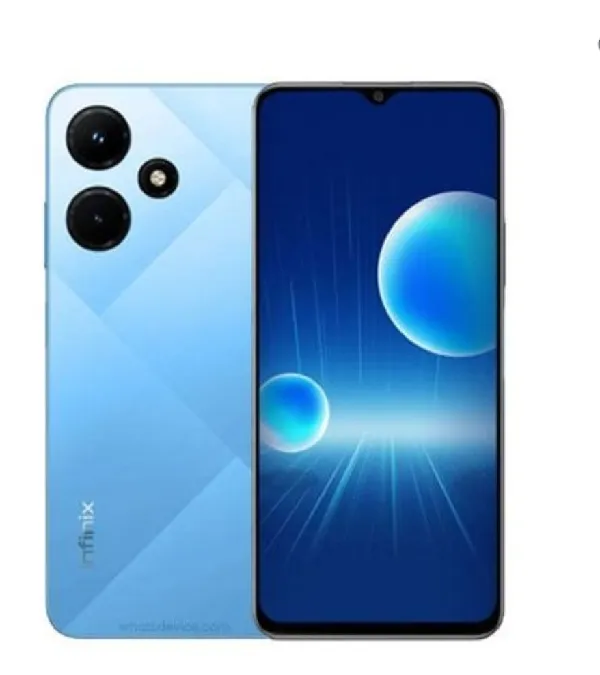


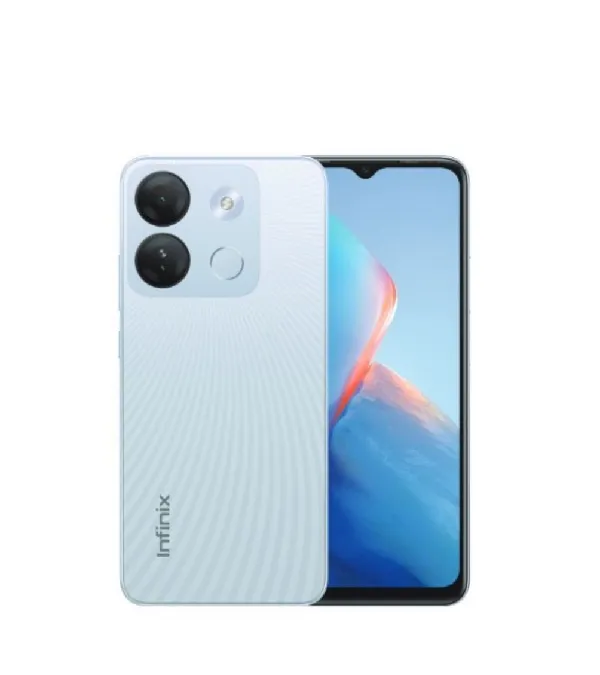
INFINIX SMART 7 (2gb+ 64ROM)
Sold by: Mamus O. Telecommucations (Phones and accessories)
SKU: TEC-69267459
Categories: Mobile Phones
You're saving with this quantity!
Product Description
INFINIX SMART 7 HD SPECIFICATION:
The Infinix Smart 7 HD is a smartphone available in Force Black, Origin Blue, and Aqua Sky colours. It runs on the Android 12 operating system and features dual Nano-SIM support. The device has a glass front, plastic back, and plastic frame design. Its 6.6-inch IPS LCD display has a 20:09 aspect ratio, 720 x 1600 pixels resolution, and a pixel density of 266 ppi. The touchscreen display supports multitouch.
Under the hood, the Infinix Smart 7 HD is powered by the Unisoc SC9863A chipset with an octa-core CPU (4×1.6 GHz Cortex-A55 & 4×1.2 GHz Cortex-A55) and an IMG8322 GPU. The device comes with 3GB of RAM and either 32GB or 64GB of internal storage, which can be expanded further via a dedicated microSDXC slot.
On the camera front, the Infinix Smart 7 HD sports an 8 MP primary camera with dual-LED flash and 1080p video recording capability, while the front-facing 5 MP camera is suitable for selfies and video calls. The device supports FM radio, audio, and video players, as well as games.
The phone packs a non-removable Li-Po 5000 mAh battery that supports fast charging. In terms of connectivity, the Infinix Smart 7 HD supports Bluetooth, GPS, Wi-Fi 802.11 b/g/n, hotspot, HSPA, LTE, microUSB 2.0, and USB On-The-Go. The device features an accelerometer and proximity sensors.
Advantages of Stock ROM:
Here are the answers to why you need to download and save the Infinix Smart 7 HD Stock ROM flash file on your computer.
- If your device is dead, you can unbrick using the Stock ROM file
- You can fix or repair the IMEI on your device using DB files from Stock ROM
- Remove any malware or Adwares from Infinix Smart 7 HD
- You can fix the boot loop issue on Infinix Smart 7 HD
- Fix Unfortunately, the app has stopped errors on Infinix Smart 7 HD
- Fix Network related issue
- Patch Boot image to Root using Magisk: Mediatek Guide or Spreadtrum Guide
- You can unroot Infinix Smart 7 HD
- To Reset or Remove FRP on your device: Mediatek FRP Guide or Spreadtrum FRP Guide
- Restore Infinix Smart 7 HD back to Factory State
Additional Details
INFINIX SMART 7 HD SPECIFICATION:
The Infinix Smart 7 HD is a smartphone available in Force Black, Origin Blue, and Aqua Sky colours. It runs on the Android 12 operating system and features dual Nano-SIM support. The device has a glass front, plastic back, and plastic frame design. Its 6.6-inch IPS LCD display has a 20:09 aspect ratio, 720 x 1600 pixels resolution, and a pixel density of 266 ppi. The touchscreen display supports multitouch.
Under the hood, the Infinix Smart 7 HD is powered by the Unisoc SC9863A chipset with an octa-core CPU (4×1.6 GHz Cortex-A55 & 4×1.2 GHz Cortex-A55) and an IMG8322 GPU. The device comes with 3GB of RAM and either 32GB or 64GB of internal storage, which can be expanded further via a dedicated microSDXC slot.
On the camera front, the Infinix Smart 7 HD sports an 8 MP primary camera with dual-LED flash and 1080p video recording capability, while the front-facing 5 MP camera is suitable for selfies and video calls. The device supports FM radio, audio, and video players, as well as games.
The phone packs a non-removable Li-Po 5000 mAh battery that supports fast charging. In terms of connectivity, the Infinix Smart 7 HD supports Bluetooth, GPS, Wi-Fi 802.11 b/g/n, hotspot, HSPA, LTE, microUSB 2.0, and USB On-The-Go. The device features an accelerometer and proximity sensors.Advantages of Stock ROM:
Here are the answers to why you need to download and save the Infinix Smart 7 HD Stock ROM flash file on your computer.
- If your device is dead, you can unbrick using the Stock ROM file
- You can fix or repair the IMEI on your device using DB files from Stock ROM
- Remove any malware or Adwares from Infinix Smart 7 HD
- You can fix the boot loop issue on Infinix Smart 7 HD
- Fix Unfortunately, the app has stopped errors on Infinix Smart 7 HD
- Fix Network related issue
- Patch Boot image to Root using Magisk: Mediatek Guide or Spreadtrum Guide
- You can unroot Infinix Smart 7 HD
- To Reset or Remove FRP on your device: Mediatek FRP Guide or Spreadtrum FRP Guide
- Restore Infinix Smart 7 HD back to Factory State
Product Grade
Grade A

Mamus O. Telecommucations (Phones and accessories)
- Store: Mamus O. Telecommucations (Phones and accessories)
- Location: Warri South
- Store Closed
About the Vendor
Customer Reviews
Reviews
No reviews yet. Be the first to review this product!